Knowing your current bank account balance is an important part of managing your finances. First Abu Dhabi Bank (FAB) offers customers several convenient ways to check their balance 24/7.
This guide will walk through the various options for checking your FAB account balance online, on mobile, at ATMs, and more.
Checking Your FAB Balance Online
Ratibi Card Salary Check – Ratibi Prepaid Card Balance Check
The FAB Prepaid Card Enquiry portal offers a convenient way to check your latest salary credited to your Ratibi Card. By entering the last 2 digits of your card number and your 16-digit card ID on the portal you can instantly view your available balance.
This reflects your most recent salary payment from your employer. The online inquiry system provides 24/7 access to check your Ratibi Card balance from anywhere without needing your physical card. It’s a quick and easy way to monitor when your salary gets deposited each month. Keeping track of your Ratibi Card balance ensures you have access to your earnings.
Here is a step-by-step guide with images about how you can check your Ratibi Card Salary Check or Ratibi Prepaid Card Balance:
Step 1: Go to the FAB Prepaid Card Enquiry portal Here.
Step 2: Enter the last 2 digits of your Ratibi card number in the first field.

Step 3: Enter your full 16-digit Ratibi card ID in the second field. You can find this on the front of your card.
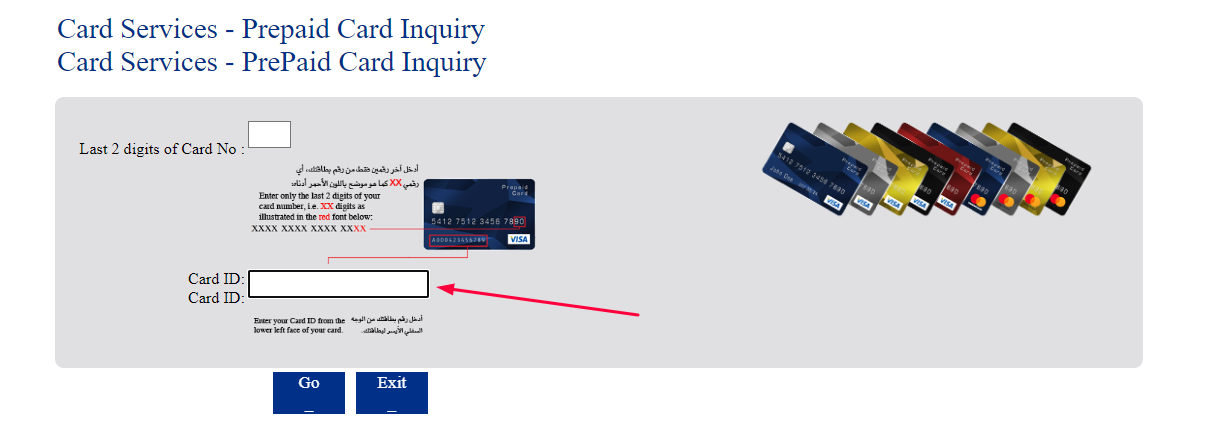
Step 4: Click on the “Go” button.
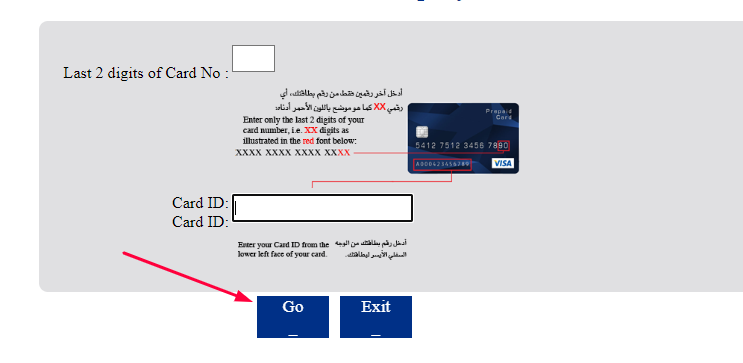
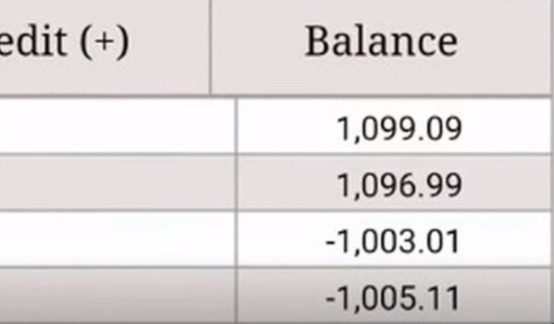
Step 5: Your available balance will be displayed on the screen. This reflects your latest salary credited.
- You can also check via FAB online banking, mobile app, or any FAB ATM using your Ratibi card and PIN.
- The online and mobile options allow instant balance checks 24/7.
- Keep your card details confidential for security when checking your balance online/on public computers.
- Contact FAB customer service if you face any issues with the balance enquiry.
FAB Prepaid Card Enquiry portal provides a quick and easy way to check your latest Ratibi Card salary balance online using your card details. Let me know if you need any clarification or have additional questions.
Checking Your FAB Bank Balance on Mobile App
In addition to online banking, the FAB mobile app is an excellent option for checking your balance from anywhere using your smartphone. The app allows you to securely access your accounts on the go and get instant balance updates.
This section outlines the process of downloading the FAB app, logging in with your credentials, accessing the balance snapshot, and viewing your updated available balance with just a tap. Using the mobile app for a quick balance check is convenient when you are out running errands or traveling.
FAB also offers a mobile banking app for iOS and Android devices. You can download the app and check your balance on the go.
Step 1: Install the FAB Mobile Banking Android app or FAB Mobile Banking iOS App on your phone.

Step 2: Open the app and log in using your online banking credentials.
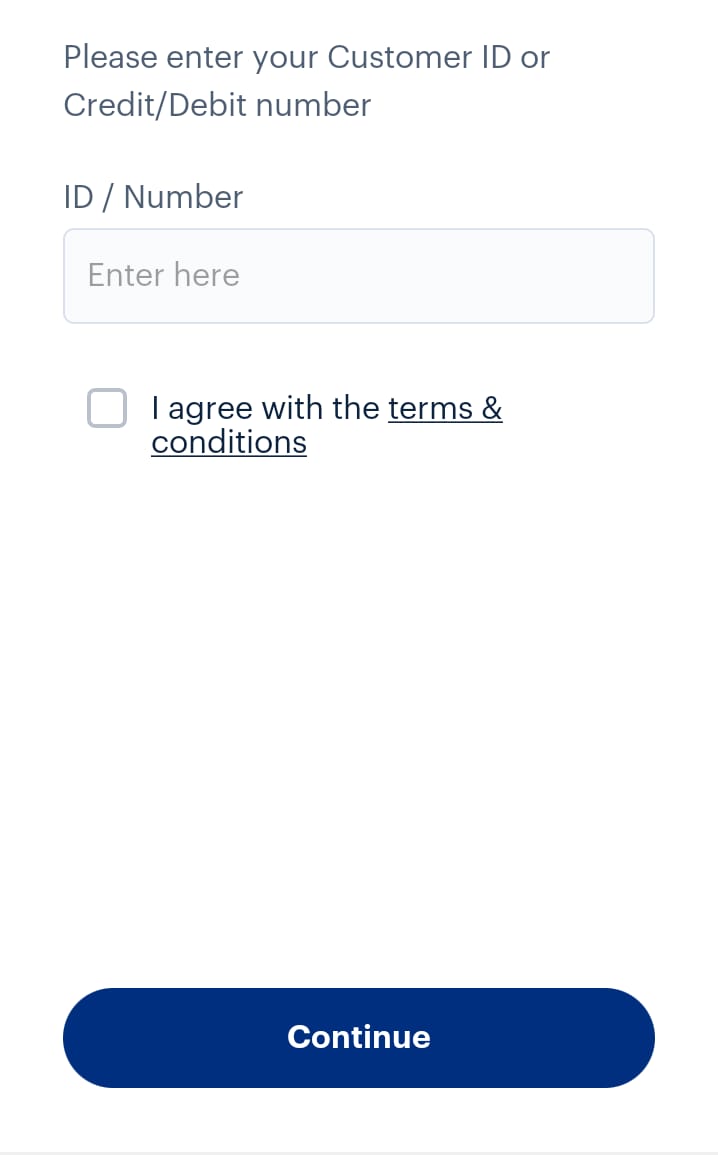
Step 3: Once logged in, tap on the account you want to view.
Step 4: You will see the current account balance displayed.
The mobile app makes it easy to check your balance on your phone within seconds. It syncs with your accounts in real time.
Checking Your Balance at ATMs
FAB’s extensive ATM network across the UAE provides another simple way to check your account balance in person. By following the steps to insert your card, enter your PIN, select the balance inquiry option, and view the balance on the screen, you can get your available balance printed out on an ATM receipt.
Understanding how to check your balance at ATMs gives you access to your account information while doing your banking at a branch.
FAB has an extensive network of ATMs across the UAE. You can check your balance at any FAB ATM.
- Insert your FAB debit card and enter your PIN when prompted.
- Select “Balance Inquiry” from the menu.
- Your available account balance will be displayed on the screen.
Using the ATM network is convenient when you want to check your balance while out and about. Just look for the FAB logo to find an ATM.
Checking Your Balance by Calling Customer Service
In addition to self-service options, FAB also enables you to check your latest balance by calling their customer service line. This section outlines the process of calling customer service, providing identifying information and account details, requesting your balance from an agent, and having the agent relay your up-to-date available balance.
Calling in for a balance check can provide a convenient alternative when you are unable to access online or mobile banking.
You can also check your FAB account balance by calling customer service:
- Call the customer service number 800 303030
- When prompted, select the language preference.
- Enter your customer ID and PIN.
- Request the agent to provide your account balance.
- They will verify your identity and then share the real-time balance.
This option is useful if you are unable to access online or mobile banking temporarily.
Setting Up Balance Notifications
Staying on top of your finances is easier when you have real-time updates on your bank account balance. FAB offers customizable balance alerts that provide you with automated notifications by SMS or email so you always know your latest balance.
To set up balance notifications, simply log into FAB’s online or mobile banking and navigate to the alerts section under settings. You can choose the frequency of alerts – daily, weekly, or monthly – and set the preferred time you want to receive them. Alerts can be configured for thresholds like low balance warnings so you avoid overdrafts.
Enabling balance notifications delivers your account information straight to your phone or inbox on the schedule you select. With real-time balance updates, you can proactively manage your money and track expenses against your budget. Automated alerts make balancing your finances effortless.
For ongoing balance updates, you can set up free balance notifications:
- On online banking, enable email or SMS alerts.
- Choose if you want daily, weekly, or monthly notifications.
- Set the time you want to receive the alerts.
- You’ll then automatically get balance updates on schedule.
Balance alerts keep you up-to-date effortlessly so you can stay on top of your finances.
Checking Your FAB Balance from the FAB Website
Online banking provides a convenient and instant way to check your FAB account balance 24/7. With just a few clicks, you can log into your account and view up-to-date information on your available balance.
This section will walk through the simple process of accessing online banking, logging into your account, navigating to the account summary page, and viewing your real-time balance. Understanding these quick steps for checking your balance online gives you access to your finances whenever you need them right from your computer.
The easiest way to check your FAB balance is through online banking.
Here’s how:
Step 1: Go to the FAB website and click on “Login (Online Banking Login)”
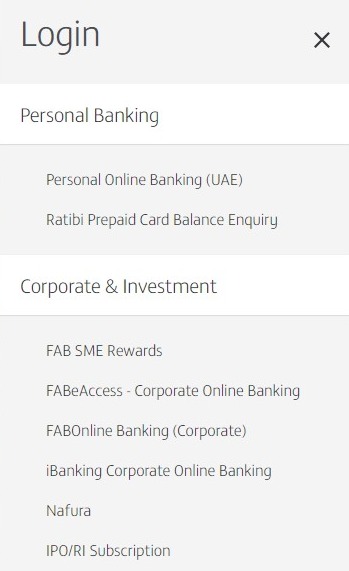
Step 2: Enter your customer ID and password and click Login.

Step 3: Once logged in, you will see an overview of your accounts. Click on the account you want to check.
Step 4: The account summary page shows your current balance available. This is updated in real time.
Checking your balance online allows instant access from your computer. It’s ideal when you want to quickly check your balance at any time.
How to Register on the FAB Online Banking App
Step 1: Install the FAB Mobile Banking Android app or FAB Mobile Banking iOS App on your phone.
Step 2: Click on “Already a Customer”
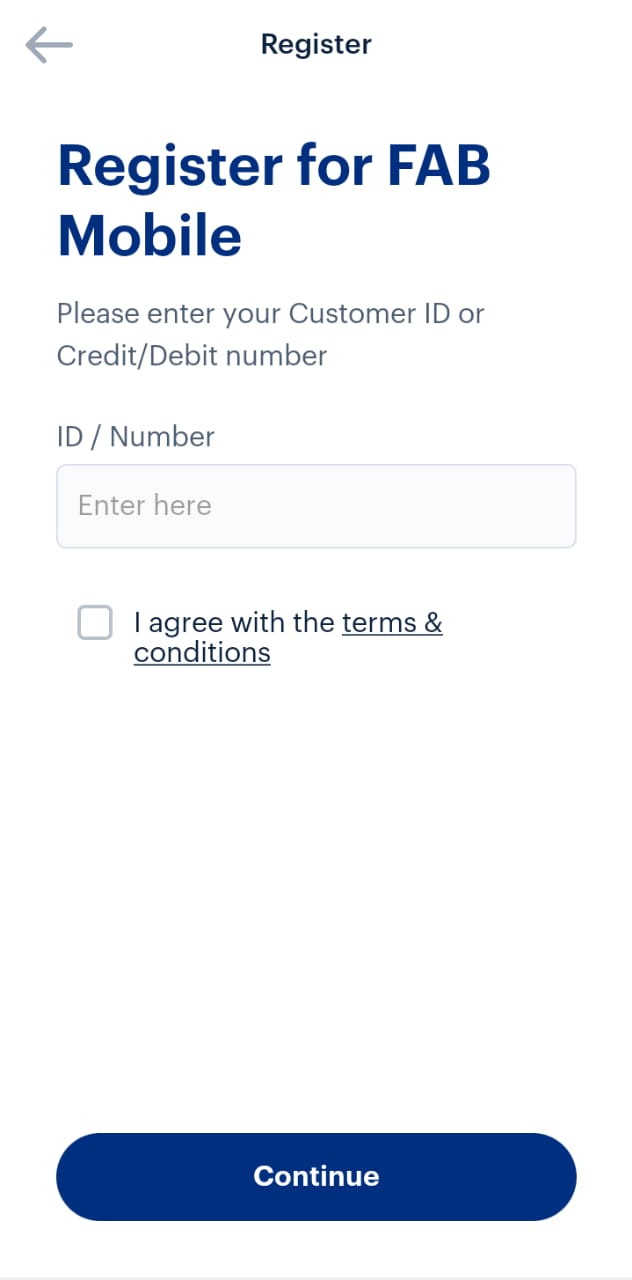
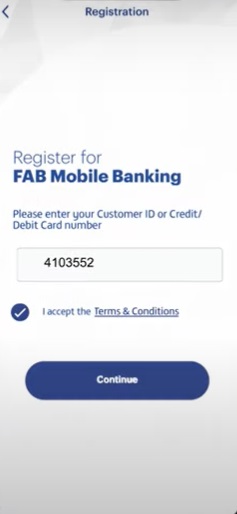
Step 3: Enter your Customer ID or Debit Credit Card Number
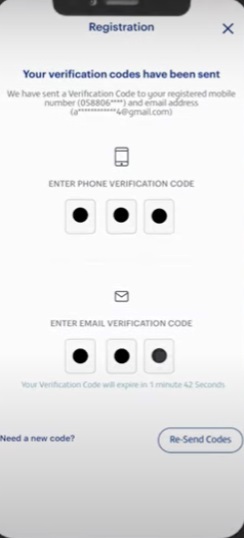
Step 4: Enter the split password sent to your registered mobile number and email.
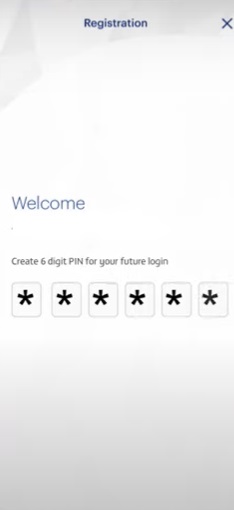
Step 5: Create a 6-digit PIN
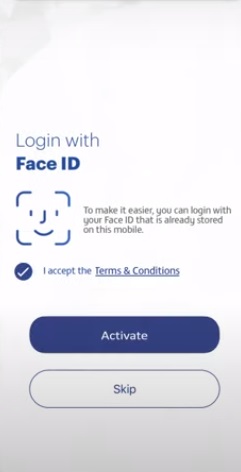
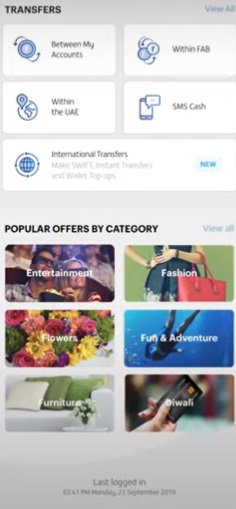
Step 6: Log in to your Account
Types of FAB Balances We Can Check
- Available Balance – This shows the amount of money you currently have available to spend or withdraw. It reflects holds for pending transactions.
- Current Balance – This includes pending transactions that have not yet cleared. It may differ from your available balance.
- Ledger Balance – This shows all settled posted transactions without pending activity. It matches your bank statement.
- Collected Balance – This only includes transactions that have fully cleared at the bank. It does not include pending deposits.
- Uncleared Funds – This reflects deposits that have been made but have not yet cleared, so the funds are not yet available.
- Overdraft Limit – If you have an approved overdraft, this shows the amount you can overdraw.
- Account History – You can view detailed transaction histories for your accounts going back months or years.
- eStatements – Download PDF statements showing full account activity for any period.
- Balance Notifications – Set up alerts to receive balance updates via SMS, email or push notifications.
The FAB online and mobile banking portals provide real-time access to view all your important account balances and transaction histories with just a few clicks. Checking your balances regularly is vital for managing your money and avoiding overdrafts.
Troubleshooting Tips
Occasionally, you may encounter issues when trying to check your FAB account balance through online banking, mobile app, ATM, or by phone. Being aware of some common problems and troubleshooting techniques allows you to quickly resolve any errors and access your balance information.
This section provides tips for troubleshooting common issues like login failures, app crashes, frozen ATM screens, wrong PINs entered, and other errors. Understanding these troubleshooting steps for fixing problems saves you time and frustration so you can conveniently check your up-to-date balance through your preferred method.
If you have issues checking your balance, here are some troubleshooting tips:
- If you can’t log in, reset your password or contact customer service.
- If the mobile app crashes, force close and restart the app. Update to the latest version.
- If the ATM screen is frozen, cancel the transaction and try a different ATM.
- If you entered the wrong PIN, contact customer service to unlock your account.
- For any other issues, call customer service for assistance.
FAQs About FAB Bank Balance Check
How can I check my FAB account balance?
You can check your FAB account balance through online banking, mobile banking, by calling customer service, or at FAB ATMs. Log into online or mobile banking and navigate to your account summary page to view your available balance in real time. You can also call 600 52 5500 and request your balance from an agent after identity verification. At any FAB ATM, insert your card, enter PIN, and select ‘Balance Inquiry’.
Is there a fee for checking my balance?
No, checking your FAB account balance through online banking, mobile app, phone, or ATM is completely free. You can check as often as needed without incurring any fees.
How current is the balance information?
The account balance shown through online and mobile banking is real-time, so it reflects the latest transactions and is always current. Balance info from ATMs or calling in may have a short delay before reflecting new transactions.
Can I check my balance without my debit card?
Yes, you can check your balance through online or mobile banking without needing your physical debit card. Just log in with your username and password credentials. Your card is only needed for ATM balance checks.
I’m locked out of mobile banking – how can I check my balance?
If you can’t access mobile banking, use online banking on a computer or call customer service at 600 52 5500 to check your balance. You can also visit an FAB ATM. Reset your mobile app access by calling customer service.
How do I set up SMS or email balance alerts?
Log into online banking, go to Alerts settings, and enable balance alerts. Choose SMS or email and set the frequency and thresholds. You’ll then get automated balance updates on your set schedule.
Is my account balance information secure?
Yes, your balance data is very secure. FAB uses encryption and other security measures. Never share online banking details with anyone to maintain security.
How far back can I see my transaction history?
You can view at least 90 days of transaction history through online or mobile banking. Download statements going back up to 12 months. Call customer service for older transactions.
Can I check my fixed deposit account balance?
Yes, you can view your fixed deposit account balance along with savings and current accounts by logging into online or mobile banking. FD details are visible in your account summary.
Does the balance show pending transactions?
The available balance excludes pending transactions until they are fully processed. The current balance includes pending transactions and may differ from your spendable available balance.
Can I Use the FAB Bank Balance Check Methods to Find the Closest Grocery Store?
Yes, you can use the FAB Bank balance check methods to find the nearest grocery store. By using the bank’s app or website, you can access the location-based services and easily find the nearest grocery store to your current location.
Key Facts about FAB Bank Balance Check
Regularly checking your FAB bank account balance is vital for financial management. FAB provides convenient and instant balance checking through digital platforms like online banking and mobile apps. Simply log in to view real-time available balances.
FAB’s widespread ATM network enables in-person balance checks by inserting your card and selecting ‘balance inquiry’. Calling FAB customer service is an alternative if online access is temporarily unavailable – agents can provide current balances after verifying your identity.
For automated updates, customize and enable email or SMS balance alerts through online banking. Choose your preferred frequency for daily, weekly, or monthly notifications. With user-friendly balance checking options, FAB account holders can monitor transaction activity, avoid overdrafts, and take control of their finances 24/7.
Online, mobile, ATM, phone, and alert balance checking gives round-the-clock access for peace of mind.
- FAB offers several ways to check your account balance including online banking, mobile app, ATMs, calling customer service, and setting up balance notifications.
- To check your balance online, log into online banking and navigate to your account summary page. You’ll see your available balance in real-time.
- The FAB mobile app also shows your instant account balance when you log in. Download the app and enter your credentials.
- Any FAB ATM lets you check your balance by inserting your card, entering PIN, and selecting ‘Balance Inquiry’ from the menu.
- You can call FAB customer service at any time and request an agent provide your current balance after verifying your identity.
- For ongoing balance updates, enable email or SMS alerts in online banking. Customize frequency and time.
- Checking your balance regularly lets you track expenses, avoid overdrafts, and stay on top of your finances.
- Online and mobile balance check options provide instant access to your account information 24/7.
- ATMs offer balance checks while doing in-person banking. Calling customer service gives an alternative if online access is unavailable.
- Automated alerts provide hands-free balance updates on your chosen schedule via text or email.
Checking your FAB bank account balance is quick and easy through online banking, mobile app, ATMs, phone, and alerts. Regularly monitoring your balance helps you track expenses, avoid overdrafts, and stay on budget. Use the method that works best for you and your lifestyle.